
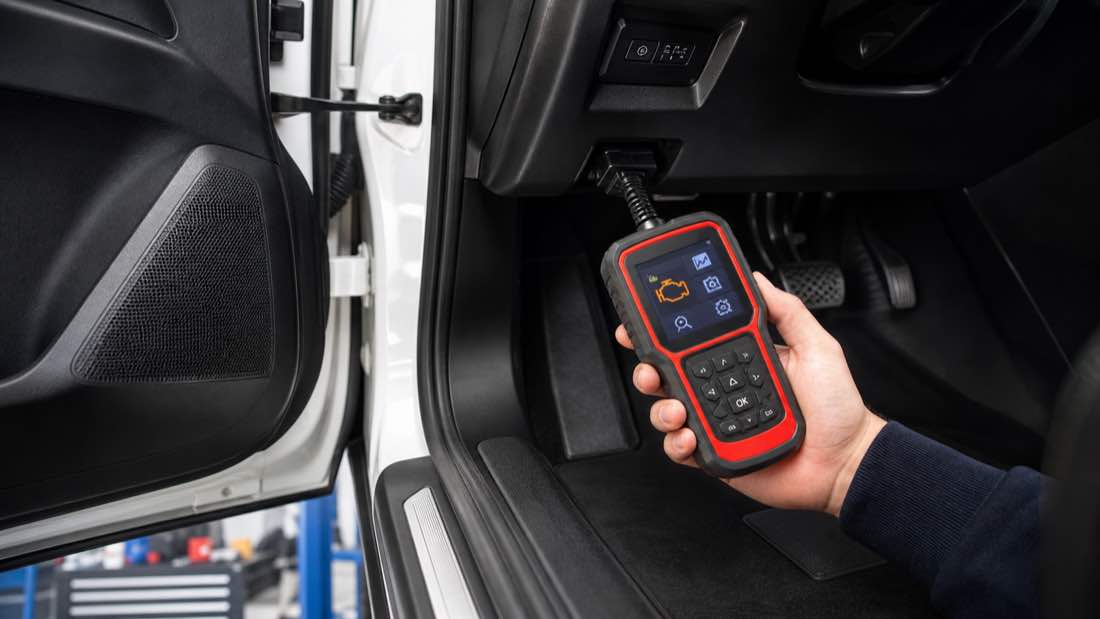
An OBD2 scanner is a tool that plugs into your car’s diagnostic port and reads information from the vehicle’s computer. For most drivers, it is useful for checking why the check engine light is on, reading diagnostic trouble codes, viewing some live sensor data, and deciding whether a problem needs quick attention or a repair shop.
The scanner does not magically tell you which part to replace. It gives clues. A code can point to a misfire, oxygen sensor circuit, EVAP leak, coolant temperature problem, or catalytic converter efficiency issue, but the code is only the start of diagnosis.
This OBD2 scanner guide explains what a scanner can do, which features beginners actually need, what to avoid, and how to use scan results without accidentally making the problem worse.
Quick Answer: What Does an OBD2 Scanner Do?
An OBD2 scanner reads diagnostic trouble codes and vehicle data from the onboard diagnostics system. On most 1996 and newer vehicles sold in the US, it plugs into a port under the dashboard near the driver’s side.
| Scanner function | What it helps with |
|---|---|
| Read codes | Shows stored, pending, and sometimes permanent trouble codes |
| Clear codes | Turns off the check engine light after codes are erased |
| Freeze-frame data | Shows conditions when a code was stored |
| Live data | Displays sensor readings while the engine runs |
| Readiness monitors | Shows whether emissions self-tests are complete |
| VIN and vehicle info | Helps identify the connected vehicle |
| ABS/SRS support | Available only on some scanners |
| Bidirectional controls | Advanced feature for trained diagnostics |
For a beginner, the most useful features are code reading, freeze-frame data, live data, and readiness monitor status. Those four features answer most early questions without overcomplicating the tool.
OBD2 Scanner vs Code Reader
People often use the terms interchangeably, but there is a difference.
A basic code reader usually reads and clears engine-related codes. It may show a short code definition, such as P0300 random misfire or P0420 catalyst system efficiency below threshold. It is cheap and simple.
An OBD2 scanner usually offers more detail. It may show freeze-frame data, live data, oxygen sensor readings, fuel trim, coolant temperature, vehicle speed, and readiness monitors. Better scanners may also support ABS, airbag, transmission, or manufacturer-specific codes.
For most everyday drivers, a good basic scanner is more useful than the cheapest code reader. You do not need a professional $1,000 scan tool to understand a check engine light, but you do want enough data to avoid guessing.
Where the OBD2 Port Is
The OBD2 port is usually under the dashboard on the driver’s side, near the steering column, lower dash, knee panel, or fuse area. It is a 16-pin trapezoid-shaped connector. Some vehicles hide it behind a small cover.
Turn the ignition to accessory or on, plug in the scanner, and follow the tool’s prompts. Some cars require the engine off for an initial scan. Others can show live data with the engine running.
Do not force the connector. It only fits one way. If the scanner will not power on, check the vehicle’s OBD fuse, cigarette lighter/power outlet fuse, scanner cable, and ignition position.
The Main Types of OBD2 Scanners
There are three common scanner types for drivers.
Basic Handheld Code Reader
This is the cheapest option. It has a small screen and reads generic engine codes. It may be enough if you only want to see why the check engine light is on.
The downside is limited data. Some basic readers show no live data, no freeze-frame details, and no ABS or airbag codes. That makes them less useful for understanding what is actually happening.
Bluetooth OBD2 Adapter
A Bluetooth adapter plugs into the OBD2 port and connects to a phone app. These are compact and convenient. Good apps can show live data, graphs, freeze-frame data, readiness monitors, and code descriptions.
The risk is app quality. Some adapters are unreliable, some apps require subscriptions, and some cheap adapters connect poorly. If you choose Bluetooth, buy one with a strong track record and a clear app policy.
Handheld OBD2 Scanner
A dedicated handheld scanner is often the best middle ground for beginners. It has its own screen, buttons, cable, and software. You do not need to pair a phone or worry about app updates while standing beside the car.
Look for live data, freeze-frame data, I/M readiness, battery voltage, and clear code descriptions. If your budget allows, ABS and SRS coverage can be useful, but do not assume every scanner supports every car system.
Features Beginners Should Look For
The best beginner scanner is not the one with the longest feature list. It is the one that gives you clear, reliable information without burying you in menus.
Code Reading and Definitions
The scanner should read generic OBD2 codes and show plain-language definitions. Codes beginning with P are powertrain codes. B codes relate to body systems, C codes to chassis, and U codes to network communication.
Generic P0 codes are standardized. Manufacturer-specific P1 codes can vary by brand. If your scanner gives only the code, use a reliable repair source before buying parts.
Freeze-Frame Data
Freeze-frame data captures engine conditions when the code set. It may show coolant temperature, RPM, speed, load, fuel trim, and other values. This can tell you whether the problem happened cold, hot, idle, highway speed, or under load.
For example, a lean code at idle may point a different direction than a lean code under load. A misfire when cold can have different causes than a misfire after the engine is hot.
Live Data
Live data lets you watch sensor values while the engine runs. Useful beginner data includes coolant temperature, short-term fuel trim, long-term fuel trim, oxygen sensor activity, throttle position, engine RPM, intake air temperature, and mass airflow readings.
Live data is powerful, but it can also mislead. A number being different from what you expected does not automatically mean the sensor is bad. Sensors report what they see; sometimes the root problem is a vacuum leak, wiring issue, exhaust leak, low fuel pressure, or mechanical fault.
Readiness Monitors
Readiness monitors show whether the car has completed emissions self-tests. This matters after clearing codes or disconnecting the battery. A car may have no check engine light but still be “not ready” for an emissions inspection.
If your state uses OBD emissions testing, do not clear codes right before inspection. The light may go out, but the monitors may not be ready.
ABS, SRS, and Transmission Coverage
Engine codes are not the whole vehicle. ABS, airbag/SRS, and transmission systems often need scanner support beyond generic OBD2. If you want to read those systems, check the scanner’s vehicle coverage before buying.
Do not assume “full system” means every module on every car. Many budget scanners have partial coverage.
What an OBD2 Scanner Cannot Do
An OBD2 scanner cannot see every problem. It cannot confirm that a part is bad just because a code mentions that part. It cannot repair mechanical wear, fix wiring, locate every vacuum leak, or measure fuel pressure unless the vehicle reports that data.
It also cannot make a car safe to drive. A flashing check engine light, severe misfire, overheating, oil pressure warning, brake warning, or strong fuel smell needs caution even if the scanner gives a simple-looking code.
Use scan data as evidence, not as a shopping list.
Should You Clear Codes?
Clearing codes erases stored information and turns off the check engine light temporarily. It does not fix the problem. If the fault is still present, the light will usually come back after one or more drive cycles.
Clear codes only after writing them down, saving freeze-frame data, and making a repair or completing a specific diagnostic step. If you clear codes before diagnosis, you may erase useful evidence.
Clearing codes can also reset readiness monitors. That can delay emissions inspection readiness. If the car is due for inspection soon, think before pressing erase.
For safety context, read our guide on whether you can drive with the check engine light on.
How to Use an OBD2 Scanner Safely
Use this simple workflow:
- park in a safe, ventilated place
- set the parking brake
- turn the ignition off before plugging in if the scanner recommends it
- connect the scanner firmly without forcing the port
- turn the ignition on or start the engine as instructed
- read stored and pending codes
- save freeze-frame data before clearing anything
- check live data only when safe
- research the code before replacing parts
- call a repair shop if the symptoms are severe
Do not watch scanner data while driving unless another person is safely operating the tool. Distracted driving is not worth a graph.
Common Codes a Beginner Scanner May Find
An entry-level scanner may show codes like:
| Code | General meaning | First thought |
|---|---|---|
| P0300 | Random/multiple cylinder misfire | Do not ignore; can damage catalytic converter |
| P0301 | Cylinder 1 misfire | Check ignition, fuel, compression, and wiring clues |
| P0420 | Catalyst efficiency below threshold | Diagnose before replacing catalytic converter |
| P0171 | System too lean bank 1 | Vacuum leak, fuel trim, MAF, exhaust leak, fuel delivery |
| P0455 | EVAP large leak | Gas cap, EVAP hose, purge/vent system, leak test |
| P0128 | Coolant temperature below thermostat regulating temp | Thermostat, coolant temp sensor, coolant level |
| P0101 | MAF circuit/performance | Air leaks, dirty MAF, wiring, airflow data |
| P0135 | O2 sensor heater circuit | Sensor heater, fuse, wiring, connector |
TorqueWiseAuto already has deeper guides for many of these, including P0300, P0420, P0171, and P0455.
How Much Should You Spend?
For many beginners, the useful range is about $40-$150. Under that, tools may be very basic but still useful for reading codes. Above that, you may get better live data, more vehicle coverage, ABS/SRS support, update options, and easier menus.
| Budget | What to expect |
|---|---|
| $20-$40 | Basic code reader, limited live data |
| $40-$80 | Better beginner scanner or Bluetooth adapter |
| $80-$150 | Stronger handheld scanner, readiness, freeze-frame, live data |
| $150-$300 | More modules, better vehicle coverage, service functions |
| $300+ | Advanced diagnostics, bidirectional controls, pro features |
Do not pay for advanced features you will not use. A beginner does not need bidirectional controls just to understand a check engine light.
Bluetooth vs Handheld: Which Is Better?
Choose Bluetooth if you like using phone apps, want graphs, and prefer a tiny adapter. Choose a handheld scanner if you want something self-contained, simple, and ready without pairing.
Bluetooth is convenient, but it depends on the app, phone battery, operating system support, and subscription terms. Handheld scanners are less flashy but often easier for quick garage checks.
For a household tool that several people may use, handheld is usually simpler. For a hobbyist who likes data, Bluetooth can be more flexible.
Beginner Live Data: What to Watch First
Live data can look intimidating because a scanner may show dozens of values. Beginners do not need to understand every sensor on day one. Start with a small group of readings that explain common check engine light problems.
Coolant temperature should climb as the engine warms up and then stabilize. If it stays unusually low, a thermostat issue may be possible. If it climbs too high, stop and investigate overheating instead of staring at the scanner.
Short-term fuel trim and long-term fuel trim show how much the engine computer is correcting the air-fuel mixture. Big positive fuel trims can point toward a lean condition, vacuum leak, unmetered air, exhaust leak before an oxygen sensor, or fuel delivery problem. Big negative fuel trims can point toward a rich condition, leaking injector, sensor issue, or too much fuel.
Oxygen sensor or air-fuel sensor data can be useful, but it is easy to misread. Do not replace an oxygen sensor just because a fuel-trim problem or exhaust leak made the reading look abnormal.
Mass airflow, intake air temperature, throttle position, engine RPM, and vehicle speed are also useful. Use them as clues that support the code, symptom, and freeze-frame data.
Modern vehicles use network communication, often through CAN bus, so a scanner may also show U codes when modules are not communicating. Network codes can be caused by battery voltage problems, wiring faults, module issues, or scan-tool compatibility problems.
Pre-Purchase Checklist
Before buying an OBD2 scanner, check these points:
- Does it read stored, pending, and permanent codes?
- Does it show freeze-frame data?
- Does it show live data clearly?
- Does it show I/M readiness monitors?
- Does it support your vehicle year, make, and model?
- Does it need a paid app or subscription?
- Can it update, and are updates free or paid?
- Does it read ABS, SRS, or transmission codes if you need those?
- Is the screen easy to read outside?
- Are the menus understandable for a beginner?
For most drivers, a simple tool you understand is better than an advanced tool you avoid using.
Mistakes to Avoid
Avoid these beginner mistakes:
- replacing the part named in the code without diagnosis
- clearing codes before saving freeze-frame data
- ignoring pending codes
- assuming a cheap scanner reads ABS and airbag codes
- buying a scanner with subscription features you do not need
- leaving a Bluetooth adapter plugged in for weeks without checking battery draw
- using live data while driving alone
- ignoring severe symptoms because the code looks small
- trusting one forum answer for every vehicle
- forgetting emissions readiness after clearing codes
The scanner should make you more informed, not more reckless.
When to Call a Mechanic
Call a mechanic if the check engine light is flashing, the engine is shaking badly, the car overheats, the oil pressure light is on, fuel smell is strong, smoke is present, the battery or charging system is unstable, or the code points to safety systems you are not trained to repair.
Also get help if the same code returns after a repair, if live data does not make sense, or if the repair requires special testing equipment. Guessing with sensors, catalytic converters, and control modules can get expensive fast.
Final Recommendation
For most drivers, the right OBD2 scanner is a simple handheld tool or reliable Bluetooth adapter that reads codes, shows freeze-frame data, displays live data, and checks readiness monitors. ABS and SRS support are nice upgrades, but they are not required for every beginner.
Buy the scanner to understand the car, not to replace diagnosis. Write down the code, read the data, check the symptoms, and use the information to decide your next safe step.
If you are building a driver tool kit, pair the scanner with the basics in our basic car tools every driver should own guide.
FAQ
Is an OBD2 scanner worth buying?
Yes, an OBD2 scanner is worth buying if you want to read check engine codes, understand basic vehicle data, and avoid guessing before talking to a repair shop.
Will an OBD2 scanner tell me exactly what to fix?
No. A scanner gives codes and data, but diagnosis is still needed. A code can point to a system or circuit without proving a specific part is bad.
Can I clear a check engine light with an OBD2 scanner?
Yes, most scanners can clear codes and turn off the check engine light temporarily. If the problem is still present, the light usually comes back.
Does every OBD2 scanner read ABS and airbag codes?
No. Many basic scanners read engine codes only. ABS, SRS, transmission, and body-module coverage depends on the scanner and vehicle.
Is Bluetooth or handheld OBD2 better?
Bluetooth is better for app-based graphs and compact storage. Handheld is better if you want a simple tool with its own screen and no phone pairing.
Can an OBD2 scanner damage my car?
Reading codes is generally safe. Risk increases with advanced functions, forced tests, coding, or bidirectional controls if you do not know what they do.
Why is my scanner not connecting?
Common causes include the ignition being off, a blown OBD or power outlet fuse, a loose connector, scanner incompatibility, or a low battery.
Should I buy the cheapest OBD2 scanner?
The cheapest scanner can read basic codes, but many beginners are better served by a slightly better tool with live data, freeze-frame data, and readiness monitor support.